Showing posts with label Apps. Show all posts

Tuesday, December 3, 2013

Monstrously Fun Alphabet App (and Bonus Spelling App!)


I was asked to review this simple alphabet app.  It looked extremely simplistic to me, but we just received iPads in the classroom and I was desperate for a way to spice up letter learning.  Some of my Kinders came in knowing fewer than 5 letters out of 52 (uppercase and lowercase).  Progress has been slow...

Now that we have iPads I can reward them with extra alphabet practice!  One lucky little guy got to be the first tester of A to Z Monsters.  He spent no more than 2 minutes on the app before there were 5 others surrounding him eagerly waiting for their turn.  I'm amazed how quickly students figure out how apps work!  Even my first graders wanted a turn at this app!  I think the app's simplicity worked to its advantage.  It was such a big hit that I even used it during transitions!  Students who lined up quickly and quietly got to press a monster and say the letter.

Here is how it works:
ScreenShot_01
Select the first letter (the first time through you must go in alphabetical order). Once selected, the monster comes to life.  The goal is to squish the monster to hear the letter name.  My students loved chasing the monsters around the screen!  I found out that some of them have better hand eye coordination than others.

This app made learning letter names fun and engaging.  The animations are really cute, too.  What I love most is that it links each letter with a word.  This is really important as my letter learners are also building their reading skills.  Hopefully they will be making the transition from letter learners to beginning sound learners soon!  Get these crazy letter monsters for your students here.

And now an app that I was not asked to review...
iTunesArtwork@2x
While browsing word work apps in the App Store, I stumbled upon Spell Sam Spell.  Ironically, it is by the same app developers as A to Z Monsters!  Spell Sam Spell is like Mario Bros with a spelling focus.  My first and second graders loved controlling the little character and collecting letters to make words.  The fun never ended with new levels and quick brain break coin collections in between.  This app brought spelling to a whole new level of fun!


Now that we have the iPads, I'm sure I'll be trying out many more apps!  You can find my ever growing list of apps for the classroom on Pinterest.


Wednesday, August 14, 2013

Best Apps for Organizing Your Library

I tested two apps for iPad that keep a record of the books in your library.  The first one is Book Crawler.  They offer a free lite version which has a limit of 25 books, but it is useful for exploring the apps features before you decide to buy the full version. I think the full version allows an unlimited number of books. The app is actually designed to record books you have read. You can input books you own, books you borrowed, etc. It has categories to track all of the information about the book, including whether or not you own it.  I haven't tested it, but I think you can use the collection category to track which books you currently have from the library.

Here is how it works:

Tap new and then select one of the input options that pop up.

I found the ISBN scanner to be very useful and accurate. Most books with a bar code could be quickly pulled up. 

Here you see I have just entered a new title. I can add any missing information as well as mark if it is in my personal collection and tag the entry.

I did run into this error three or four times out of the 150 books I scanned. I liked that the error message also gave me a solution for the problem. Going to the barcode in the inside cover worked every time!

Level It is designed to track books in a classroom library and give teachers important information such as the book's reading level.

This is the home screen.

Here is the library I created.

The screen for inputting or changing the library title and description.

Opens for how to add a new book.

ISBN scanner.

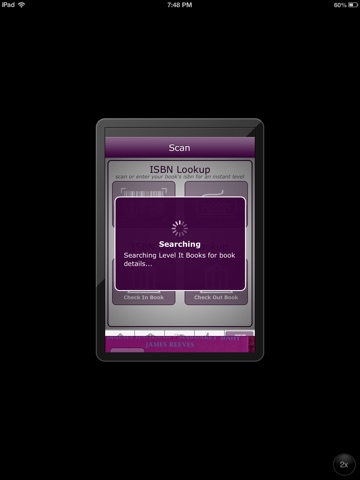
Then it searched...

A successful entry!

Level It was not as user friendly and did not successfully call up as many books by ISBN.  It did however give me the reading levels which is what I needed! 

Overall, I was very impressed with Book Crawler. It has a user friendly interface. It is also easy to add books that don't have a bar code, just enter the inf manually.  I liked that I could take photos of the covers of my books, so I would know exactly what the book looked like.  Most images that came up with the ISBN scan were accurate. I was all set to use this wonderful app when my principal told me she wanted all of my classroom library books leveled.  That is when a colleague told me about the app Level it. The idea is you only have to scan the ISBN and the app will record it in as part of your library with the guided reading and DRA level listed.  This app also boasts a check out system.
What I didn't like about Level It is that it is only built for iPhone, so you get this small, not as user friendly screen on the ipad.  It also only took about 1 in 5 books by ISBN scan.  Books that Book Crawler recognized had to be manually entered on Level It.  It also won't allow me to differentiate between books I own and books in my class library that belong to the school.  My solution is to use both apps. Book Crawler will track which books are mine and other books I come across that I want to remember. Level It will track all of the books in my class library this year and the level of each book.  I am still undecided about if I will even use the check out feature on Level It.  

How do you handle tracking the books in your library?